:SOURce:POWer[:LEVel][:IMMediate][:AMPLitude]
Description
Gets or sets the sources power level in dBm. The relation between source power level and source voltage can be described as follows.
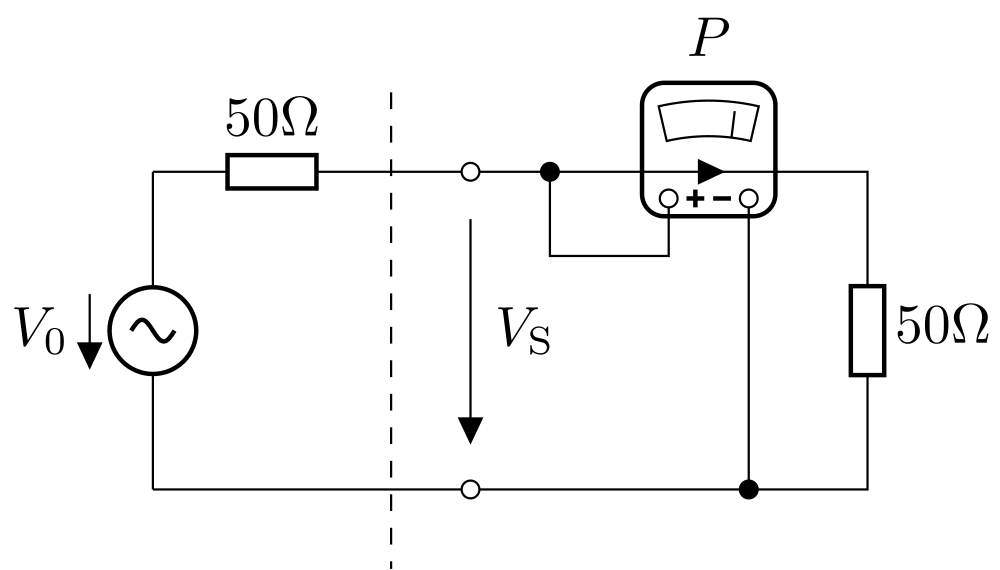
Figure: Signal Source
Referring to the figure Signal Source above \(V_0\) describes the internal source voltage and \(V_\mathrm{S}\) the voltage at the output connector which depends on the load (e.g. half of \(V_0\) at \(50\Omega\) load). The output power level \(P\) in \(mW\) is always calculated for a \(50\Omega\) system. Therefore the chosen output power level \(P\) defines the internal source voltage \(V_0\).
The output power \(P\) in \(mW\) and the output level \(L\) in \(dBm\) can be converted into each other.
Typical use cases for loads include high impedance (high \(Z\)) and a \(50\Omega\) load. For a desired output rms voltage \(V_{\mathrm{S}}\) the necessary setting for output power level \(L\) in \(dBm\) can be calculated for these cases.
Syntax
:SOURce<ch>:POWer[:LEVel][:IMMediate][:AMPLitude]
| Command | Query | Query Response |
|---|---|---|
| Yes | Yes | The sources output level in dBm. |
| Parameters | Accepted Format |
Allowed Suffixes |
Possible Errors |
Description |
|---|---|---|---|---|
{ <numeric> | MINimum | MAXimum } |
Range from Min. power to Max. power | none |
none |
The sources output level in dBm |
To learn more about channels and traces, please refer to the SCPI command structure
Sample usage
Set the sources output level to 10 dBm.
visaSession.write(':CALC:PAR:DEF GainPhase\n')
visaSession.write(':SOUR:POW 10\n')
Related commands
:SOURce:POWer
:SOURce:POWer:MODE
:SOURce:POWer:LIST:FREQuency:POINts
:SOURce:POWer:LIST:FREQuency
:SOURce:POWer:LIST:AMPLitude:POINts
:SOURce:POWer:LIST:AMPLitude