Java SCPI reference
On this page you will learn how to send SCPI-commands to a Bode device using the programming language Java.
Preconditions
National Instruments' NI-Visa is installed on the client device (e.g. PC). SCPI-Server of the Bode is up and running and the IP-address as well as port are known.
For Java there is a useful library on GitHub that enables you to use Visa with a few simple commands.
Download the library according to the README because depending on your system you may have to download some additional dependencies with it.
To use the library add it to your projects classpath.
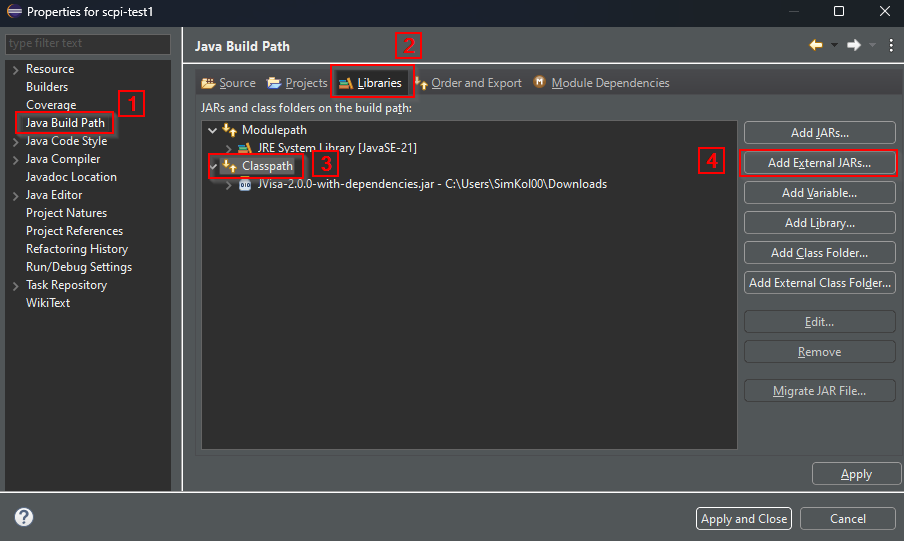
When using Eclipse go to Project->Properties
Select Java Build Path, click on Libraries and on classpath. Click on add external JARs and browse for the library you just downloaded.
In the source file import these 3 classes:
import xyz.froud.jvisa.JVisaInstrument;
import xyz.froud.jvisa.JVisaResourceManager;
import xyz.froud.jvisa.JVisaException;
Initializing a Visa Session
Note
The resource name consists of the SCPI-Server-IP and the port in the following form unless modified
The default port is 5025 for all Bode devices
String resourceName = "TCPIP::172.22.44.19::5025::SOCKET"; //replace with your IP
Now a Visa Session can be opened using the JVisa resource manager. After opening the session enable the termination character and set it to \n to prevent timeouts.
You can also set the timeout.
JVisaResourceManager rm = new JVisaResourceManager()
//open a session.
//set the read and write termination characters to \n
//enable the termination character
//set the timeout (optional)
try {
	instrument = rm.openInstrument(resourceName);
	instrument.setWriteTerminator("\n");
	instrument.setReadTerminationCharacterEnabled(true);
	instrument.setReadTerminationCharacter('\n');
	instrument.setTimeout(10000); //optional
    }
Note
With this library nearly every action can throw the JVisaException.
Be aware to catch and handle it.
Sending queries and reading responses
SCPI-Queries can be sent with the queryString() function. This also returns a read value corresponding to the response of the SCPI-Servrer.
String response = instrument.queryString("*IDN?");
String response = instrument.queryString("*IDN?", bufferSize);
However, when sending only a command with no expected response from the Server use the write() function.
instrument.write("*RST");
Catch the JVisa Exception.
As you can see in the queryString-function above, the buffer size can optionally be changed according to your specific needs, if your response exceeds the default buffer size.
If you don't know how much data you will get returned you can read the response in a loop without setting a buffer size.
//sends commands to the instrument
// Reads response in a loop if response > 1kB
// Stops when reading termination character \n
private static String queryCommand(JVisaInstrument instrument, String command) throws JVisaException {
	int bufferSize = 1024; //Read 1kB every cycle
	instrument.write(command); //send command to instrument
	ByteBuffer buf = instrument.readBytes(bufferSize); //read 1kB
	String currentChars = new String(buf.array(), 0, buf.limit());
	StringBuilder allData = new StringBuilder(currentChars);
	while(!currentChars.matches(".*\n.*")) { //while termination character is not read
		buf = instrument.readBytes(bufferSize);
		currentChars = new String(buf.array(), 0, buf.limit());
		allData.append(currentChars); //append current data to response
	}
	String response = allData.toString().trim(); //remove any whitespace from string
	return response;
}
To use the ByteBuffer type import this in your class.
import java.nio.ByteBuffer;
As you can see, when looping the read, the readBytes() function is used. This is because in the basic queryString function the response is immidiately trimmed, removing any whitespace including the termination character.
Therefore readBytes is used. Both functions are provided by the JVisa library.
Don't forget to null-terminate the strings before appending them to a result string.
Estimating Measurement duration
Important
If you want many measurement points, the measurement is going to take longer. Therefore, you might need to reconfigure the timeout as shown above to ensure the measurement is finished, before a timeout occurs.
The timeout needs to be longer than the duration of the measurement. You can calculate how long the measurement is going to take with this simple query
String time = instrument.queryString(":SENS:SWE:TIME?");
System.out.println("Measurement duration: " + time + "seconds");
This will give you an estimation on the duration and you can configure the timeout value based on this result.
Note
Calculate the duration of the measurement only after configuring the sweep settings.
Terminate
After the communication is finished don't forget to close the session to prevent errors in following command cycles.
instrument.close();
Catch the JVisa Exception.
Example connection test
Here is an example on how to test your connection to the SCPI-Server on any Bode.
import xyz.froud.jvisa.JVisaInstrument;
import xyz.froud.jvisa.JVisaResourceManager;
import xyz.froud.jvisa.JVisaException;

public class scpiclass {

	public static void main(String[] args) throws JVisaException{

		//replace with your IP
		String resourceName = "TCPIP::172.22.44.19::5025::SOCKET";

		try (JVisaResourceManager rm = new JVisaResourceManager()){
			queryIDN(rm, resourceName);
		}

	}

	private static void queryIDN(JVisaResourceManager rm, String resourceName) {
		final JVisaInstrument instrument;

		//open a session.
		//set the read and write termination characters to \n
		//enable the termination character
		//set the timeout (optional)
		try {
			instrument = rm.openInstrument(resourceName);
			instrument.setWriteTerminator("\n");
			instrument.setReadTerminationCharacterEnabled(true);
			instrument.setReadTerminationCharacter('\n');
			instrument.setTimeout(10000);

		} catch (JVisaException ex) {
			System.out.print(ex);
			return;
		}

		//Query: *IDN?
		try {
			System.out.print(instrument.queryString("*IDN?"));
		} catch (JVisaException ex) {
			System.out.print(ex);
		}

		//Close the Session after communication is completed.
		try {
			instrument.close();
		} catch (JVisaException ex) {
			System.out.print(ex);
		}
	}

}
Example Sweep Measurement
Here is an example on how to perform a sweep measurement.
package scpi_test1;

import xyz.froud.jvisa.JVisaInstrument;
import xyz.froud.jvisa.JVisaResourceManager;

import java.time.Duration;
import java.time.LocalTime;
import java.util.Arrays;
import java.util.List;
import java.util.stream.Collectors;

import xyz.froud.jvisa.JVisaException;
import java.nio.ByteBuffer;

public class scpiclass {

	public static void main(String[] args) throws JVisaException{

		//replace with your IP
		String resourceName = "TCPIP::172.22.44.19::5025::SOCKET";

		try (JVisaResourceManager rm = new JVisaResourceManager()){
			sweepMeasurement(rm, resourceName);
		}

	}

	private static void sweepMeasurement(JVisaResourceManager rm, String resourceName) {
		final JVisaInstrument instrument;

		//Adjust these values
		String startfreq = "10kHz";
		String stopfreq = "10MAHz";
		int numberOfPoints = 201;
		String sweepType = "LOG";
		String receiverBandwidth = "300Hz";

		LocalTime startTime = LocalTime.now();
		//open a session.
		//set the read and write termination characters to \n
		//enable the termination character
		//set the timeout (optional)
		System.out.print("Trying to connect to Visa resource: "
		+ resourceName + "\n");
		try {
			instrument = rm.openInstrument(resourceName);
			instrument.setWriteTerminator("\n");
			instrument.setReadTerminationCharacterEnabled(true);
			instrument.setReadTerminationCharacter('\n');
			instrument.setTimeout(2500);

		} catch (JVisaException ex) {
			System.out.print(ex);
			return;
		}

		try {
			//Get the Bode id
			String id = queryCommand(instrument, "*IDN?");
			System.out.print("SCPI client connected to SCPI Server: "
			+ id + "\n");

			//Trying to lock the Bode device
			String lockOK = queryCommand(instrument, ":SYST:LOCK:REQ?");
			System.out.print(lockOK + "\n");
			if (lockOK == null) {
				System.out.print("Locking unsuccessful, exiting\n");
				return;
			}
			else {
				System.out.print("Locking successful\n");
			}

			//Measurement configuration
			instrument.write(":SENS:FREQ:STAR " + startfreq);
			instrument.write(":SENS:FREQ:STOP " + stopfreq);
			instrument.write(":SENS:SWE:POIN "
			+ Integer.toString(numberOfPoints));
			instrument.write(":SENS:SWE:TYPE " + sweepType);
			instrument.write(":SENS:BAND " + receiverBandwidth);

			//Estimate Measurement duration
			String time = queryCommand(instrument, ":SENS:SWE:TIME?");
			System.out.println("Measurement duration: " + time + "seconds");

			//One-port impedance measurement
			instrument.write(":CALC:PAR:DEF Z");
			//linear magnitude in ohms + phase (deg)
			instrument.write(":CALC:FORM SLIN");

			//Initialise trigger system use bus as source
			instrument.write(":TRIG:SOUR BUS");

			//initialise trigger
			instrument.write(":INIT");
			instrument.write(":TRIG:SING");

			//Wait for all operations to finish
			queryCommand(instrument, "*OPC?");

			//get measurement results
			String frequencyValues =
			queryCommand(instrument, ":SENS:FREQ:DATA?");

			String allResults = queryCommand(instrument, ":CALC:DATA:SDAT?");

			System.out.print(frequencyValues + "\n");
			System.out.print(allResults + "\n");

			//Transform data into readable List
			List<Float> allResultsListRaw =
			Arrays.stream(allResults.split(","))
			.map(Float::parseFloat).collect(Collectors.toList());

			List<Float> frequencyListRaw =
			Arrays.stream(frequencyValues.split(","))
			.map(Float::parseFloat).collect(Collectors.toList());

			List<Float> magnitudeRaw =
			allResultsListRaw.subList(0, numberOfPoints);

			List<Float> phaseRaw =
			allResultsListRaw.subList(numberOfPoints,
			allResultsListRaw.size());

			//Printing the first measurement as example
	        System.out.print("Frequency: " +frequencyListRaw.get(0) +"Hz;" +
			"\tMagnitude: " + magnitudeRaw.get(0) + " Ω;" +
			"\tPhase: " + phaseRaw.get(0) + "°\n");

	        //Trying to release the bode device
	        String relOK = queryCommand(instrument, ":SYST:LOCK:REL?");
			System.out.print(relOK + "\n");
			instrument.close();

			Duration duration = Duration.between(startTime, LocalTime.now());
			System.out.print("Duration of the Measurement: " +
			duration.getSeconds() + " seconds\n");

		} catch (JVisaException ex) {
			System.out.print(ex);
		}

	}

	//sends commands to the instrument
	// Reads response in a loop if response > 1kB
	// Stops when reading termination character \n
	private static String queryCommand(JVisaInstrument instrument, String command)
	throws JVisaException {
		int bufferSize = 1024; //Read 1kB every cycle
		instrument.write(command); //send command to instrument
		ByteBuffer buf = instrument.readBytes(bufferSize); //read 1kB
		String currentChars = new String(buf.array(), 0, buf.limit());
		StringBuilder allData = new StringBuilder(currentChars);
		//while termination character is not read
		while(!currentChars.matches(".*\n.*")) {
			buf = instrument.readBytes(bufferSize);
			currentChars = new String(buf.array(), 0, buf.limit());
			allData.append(currentChars); //append current data to response
		}
		//remove any whitespace from string
		String response = allData.toString().trim();
		return response;
	}
}